
Know what you have. Where it is. What to order.
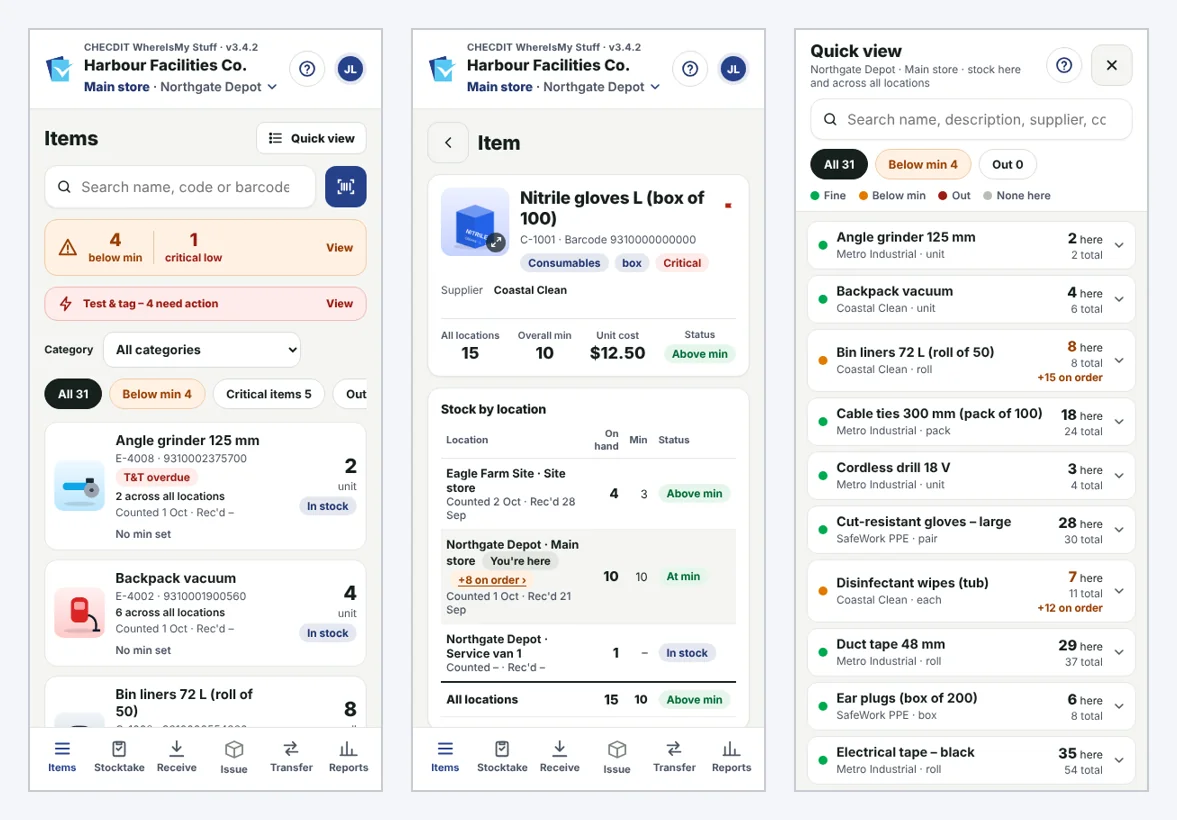
A working, tested stock management application for teams managing stock across stores, sites, vehicles and workshops.
See it working ↗Practical tools for the way you work.
Manage stock across storerooms, service vans and sites with barcode scanning, stocktakes, receiving, transfers and reorder planning.
- Find stock by location, barcode, item code or supplier
- Quick counts, fast camera scanning and optional shared stocktakes
- Receive, transfer and issue stock with movement history
- Below-minimum alerts, suggested reorders, supplier order lists and deliveries
- Equipment test-and-tag tracking, usage reporting and an administrator dashboard
- Optional Business Central purchase-quote export
See the process, not just the features.
Set up
Find items at every location
Count
Count or scan stock
Control
Record deliveries, transfers and usage
Reorder
Review shortages and order with confidence
Voice entry: talk instead of type
Search for items by voice, and say quantities in stocktakes, receiving and transfers — “5 and next” — so hands stay free and eyes stay on the shelf.
Frequently asked questions
No matching questions. Ask us directly.
What industries does it work for?
Most businesses that use stock, not just sell it, including cleaning and facilities, trades and workshops, kit builders, and businesses that hold tools and equipment. It is set up around your items, sites and the features you need.
How is it different from other apps?
Most stock apps are built for selling stock. WhereIsMy Stuff is built for businesses that use it across sites, vans and store rooms. It is set up around your items, sites and look, you switch on only the features you need, your team can count by voice or camera scan on their phones, and your data stays in your own Google Sheet.
Does it replace Xero, MYOB or Business Central?
No. Keep your accounting system for the accounts and use WhereIsMy Stuff for counting and using stock across your sites. Your item list can load from a Xero or MYOB export, and order lines copy straight into a Business Central purchase quote.
Can my team use it on their phones?
Yes. WhereIsMy Stuff runs in the web browser on a phone, tablet or computer, so there is nothing to install. Each person signs in with their own name and PIN.
Can we count stock by voice?
Yes. You can search for items by voice and say quantities in stocktakes, receiving and transfers — for example “5 and next”.
Does it work with poor signal?
Yes. Receiving, transfers and issuing keep working when the signal drops. Saves wait on the device and send automatically when signal returns, never twice.
Does it tell us what to reorder?
Yes. Suggested reorder works out what to order by supplier from your minimum levels and average weekly use, and the order list tracks each order through to delivery.
How secure is sign-in?
Everyone signs in with their own name and PIN, so every count and stock movement is recorded against the person who did it. PINs are 6 to 8 digits (8 for Admins), and easy PINs such as dates, runs like 123456 or repeated patterns are refused. Five wrong PINs lock that name for 15 minutes, and sign-in expires after 6 hours.
Who can change items and settings?
Only Admins can add or edit items, users and settings, and every Admin change is recorded in a change log. When someone leaves, an Admin switches them off and their history stays.
Where is our data kept?
Your data stays in your own Google Sheet.
Can I suggest a feature or get a demo?
Yes. CHECDIT is built to adapt to your business, so tell us what you need and we will look at whether it can be added. To suggest a feature or book a demo, use the contact page or email info@checditinnovations.com.
See how it could work for your business.
Tell us about the workflow you're trying to improve. We'll show you a relevant working application.
Request a demonstration